
Tournament TV needs to be configured in Tournament Planner and connected through the network to display matches during the tournament.
Steps
Follow these steps to configure Tournament TV:
-
Open the main menu in Tournament Planner.
-
Select Extra.
-
Choose Options.
-
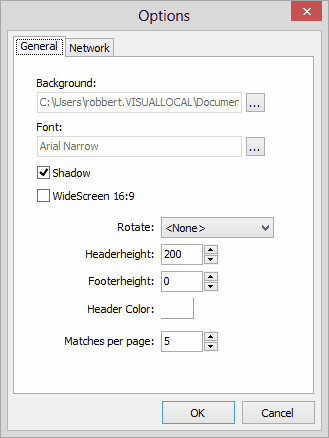
In the General tab, configure the presentation settings.
You can configure the following options:
-
Select a background image for the presentation. The software includes several default images, some with a header.
-
Click Browse to select a background image or create and use a custom background image with third-party software.
-
Set the header height and footer height to prevent content from overlapping with header or footer areas.
-
Select the font color for the header.
-
Use Matches per page to define how many matches are displayed simultaneously.
-
Enable the Shadow option when using a large presentation screen for improved visual appearance.
Before using Tournament TV, you must configure the network connection.
-
Find the IP address of the computer running Tournament TV. This IP address is displayed in the title bar of the Tournament TV application.

-
In Tournament Planner, open the main menu.
-
Select Extra.
-
Choose Tournament TV.
-
Click Add and enter the network addresses of the computers running Tournament TV.
This allows Tournament Planner and Tournament TV to communicate correctly.