
In the Online Tournament Planner, you can set the time until which players can submit their unavailability for each day.
After the set time, new unavailability entries will no longer be taken into account, and players will be considered available for scheduling.
Adjusting the time for unavailability
The time at which unavailability is disabled can be adjusted for each day using the clock icon in the planner.
By default, this time is set to 23:59. This means that players can submit their unavailability throughout the day.
Would you like players to be fully available for scheduling from an earlier time? You can then adjust the time for each individual day.
Example
Is the time set on 22:00 oclock?
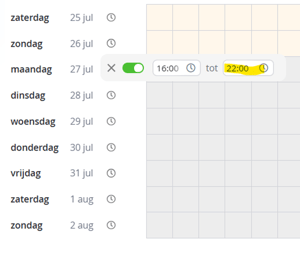
Then the following applies:
- Until 22:00, players can still submit their unavailability.
- From 22:00 onwards, new unavailability entries will no longer be accepted.
- From that moment onwards, players will be considered available for scheduling.
Recommendation
We recommend keeping the default setting of 23:59, unless you have deliberately chosen to close the submission of unavailability earlier in the day.
When scheduling a tournament, always check the times set for submitting unavailability. This setting can differ per day and can be adjusted using the clock icon in the planner.