
Stages are the different phases or rounds within an event.
This allows you to structure the event.
Usually the number of entries determines the structure you select.
These are some common situations:
1. Single stage
The event is just 1 draw, for example an elimination or round robin, and therefore only needs 1 stage.
2. Round robins with elimination (groups with playoff)
In the group stage all players are divided into groups or round robins
The best 1 or 2 players advance to the elimination draw.
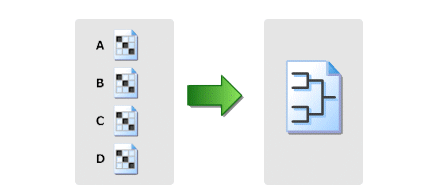
3. Qualification and main draw.
De best players (based on ranking) are directly accepted into the main draw.
The remaining players first need to play the qualification and the best advance to the main draw. Those players are called qualifiers.
This is how grand slams are played.
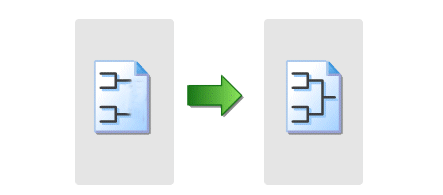
Of course you are free to setup any other situation yourself with multiple stages.
Learn how to create a new league in League Planner and configure events, match days, locations, scoring, and online entry settings.
Steps
Create a new league
-
Open League Planner.
-
Open the main menu.
-
Select League → New.
-
Enter a name for the league.
-
Click Save.
The league is now created.
Configure League Properties
After creating the league, configure the required settings.
Info tab
Enter general league information:
-
League name
-
Contact details
-
Information published on the league website
Address tab
Provide:
-
Contact information
-
League location details
Events tab
Here you can manage league events:
-
Add, edit, or delete events
-
Events can only be deleted if no entries or draw sheets exist
-
Import events from a previous league using Import
-
Add new events using Add
-
Select the correct league from the dropdown menu if multiple leagues exist
Rubbers tab
Define:
-
Individual player matches (rubbers)
-
Order of play
Days tab
-
Add or remove match days
-
Days cannot be removed if matches are already scheduled
Times tab
Configure match time slots:
-
Select the number of time slots per day.
-
Enter times manually or generate them automatically.
-
Apply times to a single day or all days.
Locations / Courts tab
Define venues and courts:
-
Add or edit locations in Location Properties.
-
Assign a location name.
-
Create available courts.
-
Optionally define court availability per day in Available Courts.
-
Apply settings to one day, all days, or copy between days.
Team Points
Choose how team scores are calculated:
-
Points per match
or -
Sum of player points
You can define points awarded for:
-
Wins
-
Losses
-
Draws
Rules for standings calculations can also be configured and reordered.
Player Points tab
Define how teams receive points based on individual matches:
-
Points per rubber
-
Per set
-
Per game
Draws tab
Contains general settings related to draws.
Score tab
Manage scoring formats:
-
Create or edit scoring formats
-
Enable automatic score completion during result entry
Officials tab
Add officials by:
-
Manual entry, or
-
Importing from an Excel file
Entry Fees tab
Add optional or mandatory items to the online entry form:
-
Define item name and fee.
-
Choose how it appears online:
-
Quantity selection
-
Custom text field
-
Yes/No option
-
-
Mark items as mandatory if required for registration.
After completing these settings, the league is ready for scheduling, entries, and publication.